vkQuake is stable, but a fresh install can still fail for a few predictable reasons. Most errors come down to three causes: the engine can't find the game data, the graphics driver doesn't provide a working Vulkan device, or a mod or setting doesn't agree with your hardware. Work through the sections below in order.
"Couldn't load gfx.wad" or missing pak0.pak
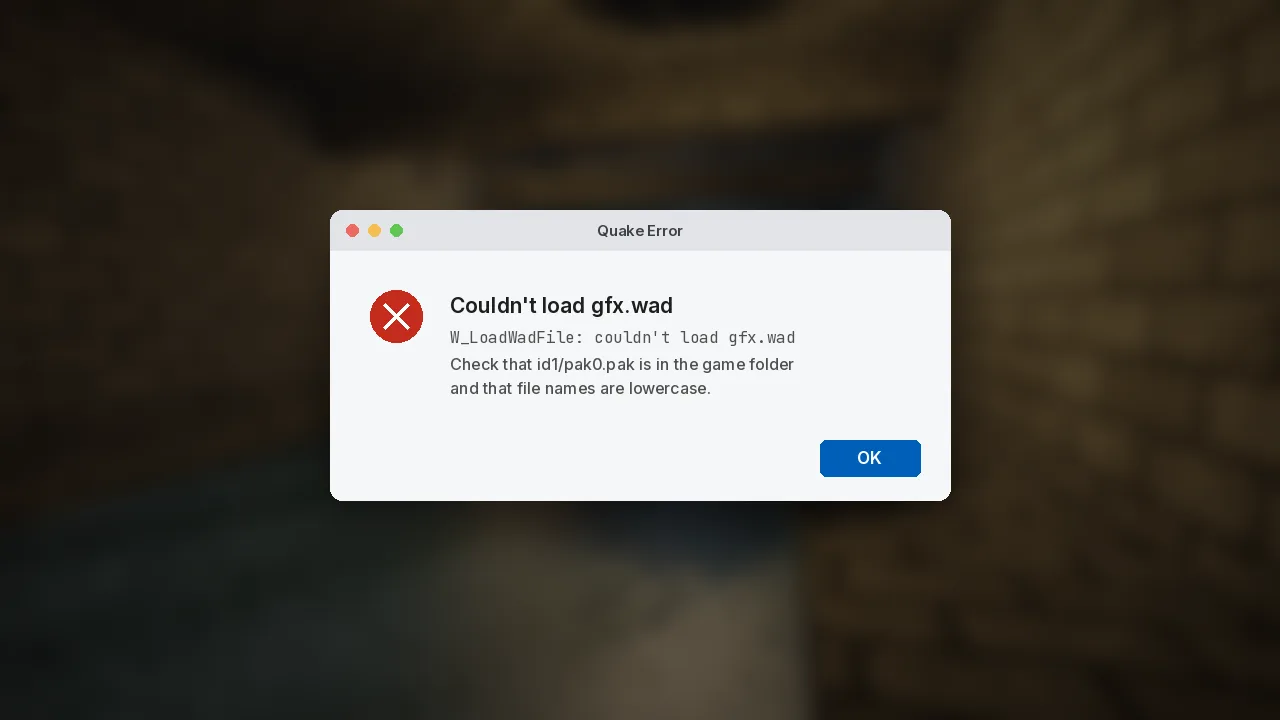
This is by far the most common error. It means vkQuake started but couldn't find Quake's data files. Fix it in this order:
- Confirm that
pak0.pakexists inside anid1folder. It is about 18 MB.pak1.pakholds the rest of the full game. - Make sure
vkQuake.exe(or the AppImage) runs from the folder that containsid1, or pass that folder with-basedir. - On Linux, make sure the names are lowercase:
id1andpak0.pak. - If you use the installer, let it detect your Steam, GOG or Epic copy again, or choose the folder manually when it asks.
No Vulkan device or "failed to create instance"
vkQuake needs a GPU and driver that support Vulkan. Update to the latest driver from NVIDIA, AMD or Intel; on Linux, update Mesa or install the NVIDIA proprietary driver. Laptops with two GPUs sometimes launch on the integrated chip, so set vkQuake to use the high-performance GPU in Windows Graphics Settings or your driver control panel. Very old GPUs, roughly pre-2012, may not support Vulkan at all. In that case, an OpenGL port such as QuakeSpasm is the right choice. See our port comparison.
Crashes on launch or when loading a map
First, delete or rename config.cfg (in %APPDATA%\vkQuake for installer builds, or in id1 otherwise) to rule out a bad setting. Next, try the game without mods. If only one mod crashes, check that it supports QuakeSpasm-family engines and was extracted to the right place. Overlays and injectors such as old ReShade builds or recording tools can also interfere with Vulkan, so disable them while you test. When you report a crash, include the output of version and a condump, as described in the console guide.
Windows blocks the installer
SmartScreen warns about programs that aren't signed by a large publisher. Download only from the official GitHub release linked on our download section, check the file name, then choose More info > Run anyway. You can also compare the SHA-256 hash we publish with your file using certutil -hashfile file.zip SHA256.
No music
The 2021 re-release has music that works automatically. For the classic game, the soundtrack must be loose audio files (OGG, MP3, FLAC or WAV) named track02.ogg, track03.ogg and so on, placed in id1/music. Expansion soundtracks go in hipnotic/music and rogue/music. The Steam version of the original game doesn't include these files.
Stutter or uneven frame pacing
Set host_maxfps to your refresh rate rather than leaving it uncapped, and try toggling V-Sync. On variable refresh rate displays, cap the frame rate a few frames below the maximum. Turn dynamic shadows off to see whether ray tracing is the bottleneck. On Linux, check that the game runs on your discrete GPU (the startup line in the console names the Vulkan device).
Mouse feels wrong
vkQuake reads mouse input through SDL, so Windows pointer acceleration doesn't apply. If movement still feels floaty, check that V-Sync is off and the frame rate is stable, then adjust sensitivity in small steps.
Still stuck? Search the issue tracker on the official GitHub repository. Many problems are already documented there with workarounds.