vkQuake runs Quake on Windows through Vulkan, and getting it working takes about five minutes. You need two things: the vkQuake engine, which is free, and the Quake game data, which comes from your own copy of the game. This guide covers both install routes the developer offers for Windows, the official installer and the portable ZIP, and explains when to pick each one.
Before you start
Check three things first. Your PC should run 64-bit Windows 10 or Windows 11, on either an Intel/AMD (x64) or an Arm (ARM64) processor. Your graphics driver must support Vulkan, which every NVIDIA, AMD and Intel driver from the last several years does. And you need a legal copy of Quake from Steam, GOG or the Epic Games Store. vkQuake does not include the game's levels, monsters or sounds; those live in pak0.pak and pak1.pak inside the id1 folder of your Quake install.
If you only own the shareware episode, pak0.pak on its own still works, but you will only be able to play the first episode.
Option 1: the official installer (recommended)
The vkQuake project recommends the installer for most Windows users, and it is the easiest route.
- Open the download section and get vkQuake-Installer-windows_x64-1.36.0.exe from the official GitHub release.
- Run the installer. Windows SmartScreen may show a "Windows protected your PC" notice because the file is not signed by a large publisher. Click More info, check that the file came from github.com/Novum/vkQuake, then choose Run anyway.
- Finish the setup. The installer adds Start menu entries for both the classic game and the 2021 re-release.
- Launch vkQuake from the Start menu. It looks for Steam, GOG and Epic installs on its own. If it can't find one, it asks you to pick your Quake folder once and then remembers it.
A nice side effect of the installer is that your saves and config.cfg are written to %APPDATA%\vkQuake rather than to the game folder, so Steam updates or a reinstall won't wipe your progress.
Option 2: the portable ZIP
The ZIP suits players who keep several source ports side by side, run Quake from a USB drive, or simply prefer not to install anything.
- Download vkQuake-1.36.0_windows_x64.zip (Intel/AMD) or vkQuake-1.36.0_windows_arm64.zip (Snapdragon and other Arm PCs).
- Find your Quake base folder, the one that contains
id1. On Steam this is usuallyC:\Program Files (x86)\Steam\steamapps\common\Quake. - Extract every file from the ZIP into that base folder and allow it to overwrite existing files.
- Double-click
vkQuake.exe.
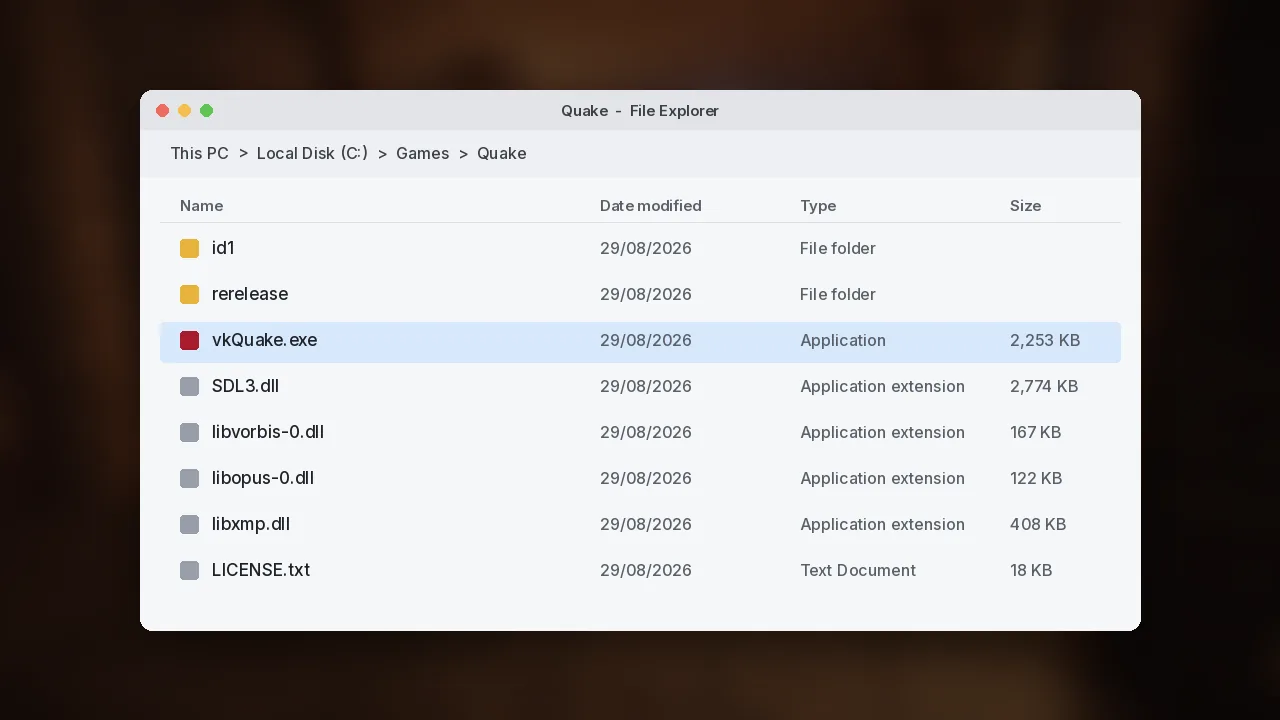
The folder should end up looking like the screenshot above: vkQuake.exe, SDL3.dll and the audio libraries next to the id1 folder. If you copied files into id1 by mistake, move them up one level.
First launch checklist
Once the game starts, open Options > Video and set your monitor's native resolution, then raise Max FPS to match your refresh rate. vkQuake keeps game physics stable above Quake's original 72 Hz limit, so a 144 Hz or 240 Hz monitor can be used fully. Our settings guide explains each option in more detail.
To play the remastered campaign and expansions, launch the "re-release" shortcut the installer created, or copy the portable files into the rerelease folder of your Steam install. The 2021 re-release guide walks through it.
If something goes wrong
The most common first-launch error is a message saying the engine couldn't load gfx.wad. That almost always means vkQuake is not looking at the folder that holds id1\pak0.pak. Point the installer at the right folder, or move the portable files so they sit beside id1. A Vulkan error at startup usually means an outdated graphics driver. Both problems, and several more, are covered in our troubleshooting guide.
That's all there is to it. Once vkQuake runs, the custom maps guide is a good next stop, because the community has released hundreds of excellent levels.